
Onboarding & offboarding tool
- automate and simplify processes

Efficient onboarding. Strong teams. From day one.
The onboarding & offboarding tool from partimus digitizes the entire employee lifecycle – from account creation to license withdrawal.
All steps are automated and orchestrated via Microsoft Power Automate, Graph API and Entra ID so that HR and IT can work together smoothly. Manual tasks such as hardware issue or approvals are standardized via SharePoint and Teams.
The result: less effort, clear responsibilities and a structured process that creates security and transparency.
- Microsoft 365 integration
- GDPR-compliant
- Automated workflows
Automated processes for HR & IT
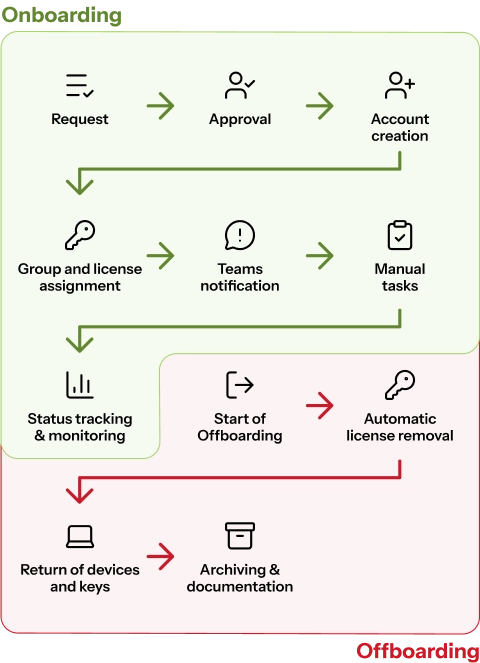
The onboarding & offboarding tool controls all the steps involved in employees joining or leaving the company. From user creation to license allocation and device management, every process is automated and traceable.
In local AD & Entra ID. Access only for authorized HR or management groups.
Via Microsoft Power Automate, e.g. managing director confirms onboarding request before account creation.
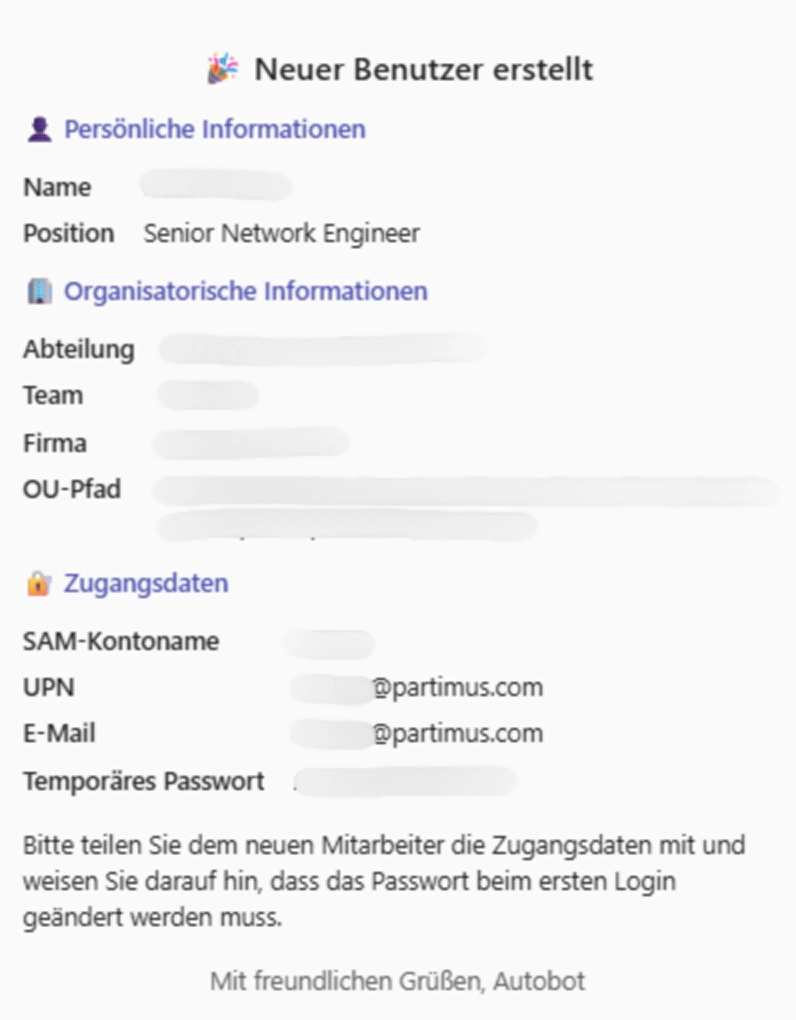
OU assignment, automatic assignment of samAccountName, UPN, temporary password and group assignment based on position, department and location.
Bot notification in the "Onboarding Hub", adaptive map with all employee details and live status display for OU, UPN, password, groups and licenses.
Defines tasks (e.g. laptop, access card, business card) and responsible persons (e.g. IT, HR, facility). Tasks are automatically created, assigned and organized in team buckets.
License revocation, device and key return and deactivation in AD & Cloud.
Overview of who was onboarded and when, status of all tasks in the onboarding hub, real-time statistics and history.
Microsoft integration at enterprise level
The tool is based entirely on Microsoft technologies such as Power Automate, Graph API, Runbooks and Entra ID. This allows users, groups and authorizations to be managed directly in the Microsoft ecosystem – securely, stably and with low maintenance.
The tool integrates seamlessly into your existing Microsoft infrastructure, without additional interfaces or third-party software. As a result, users, groups and licenses are managed centrally and changes are immediately applied system-wide.
All accounts and authorizations are automatically synchronized so that there are no duplicate or outdated entries. This saves time, reduces errors and ensures consistent data in cloud and on-premise systems.
The onboarding tool can be flexibly adapted to complex company structures - such as multiple locations, subsidiaries or clients. This allows you to retain central control, while individual units can be managed independently.
Login is via Microsoft Entra ID with modern security standards such as multi-factor authentication. This reliably protects access and strengthens the compliance of your IT environment.
All data is stored and processed exclusively in certified data centers in Germany. This guarantees maximum security, GDPR compliance and traceable data sovereignty for your company.
Challenges in onboarding - and how the tool solves them
Many companies with a hybrid IT infrastructure manage onboarding processes with Excel lists, emails or isolated tools – an error-prone, time-consuming approach. The Onboarding & Offboarding Tool bundles all tasks in a central workflow: users are created automatically, licenses are assigned and tasks are distributed to the responsible departments. HR, IT and management maintain an overview of status, responsibilities and deadlines at all times.
- No standardized process for onboarding between local AD and cloud
- Manual, error-prone account setup
- Unclear responsibilities between HR, IT and managers
- Time-consuming license allocation and group maintenance
- Lack of overview of tasks, status and deadlines
- Standardized, automated process for onboarding and offboarding via Microsoft Power Automate and Entra ID
- Fully automated account creation in the local Active Directory and in the cloud
- Clear allocation of roles and tasks between HR, IT and management through defined workflows and approval steps
- Central dashboard with real-time status, deadline overview and process history
- Automatic license and group management based on position, department and location
The technology behind the workflow
Our solution combines four powerful Microsoft components:

Orchestrates forms, approvals, notifications and task flows.

For the secure, direct management of users, groups and licenses in Microsoft 365.

For complex actions in the local Active Directory.


For rule definition, task control and transparent communication in the onboarding hub.
Digitize your employee processes
With the onboarding & offboarding tool from partimus, you can standardize processes between HR and IT, reduce manual tasks and create transparency across all employee processes. Benefit from clear workflows, automated license allocation and integration that fits seamlessly into your Microsoft 365 environment.
Prices for the onboarding & offboarding tool
partimus offers the tool as a modular license model – ideal for companies with 30 to 2000 employees. The price depends on the number of employees in your company. In the one-off setup, we set up the onboarding & offboarding tool together with you, tailored to your needs.
incl. onboarding workshop & flow design
✅ Onboarding workshop & process recording
Definition of parameters (department, location, role, license package)
✅ Development of customized automations for AD & Entra ID
Integration into existing HR systems (e.g. HRWorks, Personio, DATEV)
(up to 100 employees)
+50 €/month per additional 100 employees
✅ Secure web form with Entra ID login
✅ Approval workflow
Automatic account creation in the local AD and in Entra ID
✅ Team integration
✅ SharePoint rule table for tasks that cannot be automated
✅ Offboarding with the same standard process
✅ Website dashboard
*All prices are monthly/non-recurring fees plus VAT. Our offer is aimed exclusively at traders.
Who is the onboarding tool suitable for?
The tool is designed for organizations that want to professionalize and standardize their employee management. HR teams and IT departments in particular benefit from automated workflows, clear responsibilities and minimal manual effort.
The onboarding tool connects local Active Directory environments with the cloud and ensures uniform, automated user management - ideal for hybrid IT landscapes.


Users, groups and licenses are managed automatically thanks to direct integration with Microsoft 365 and Entra ID. This allows companies to benefit from an end-to-end connected system.
Approvals, workflows and tasks can be mapped and tracked completely digitally. This reduces manual effort and creates clear, transparent processes.
Automated account creation, authorization management and offboarding processes relieve IT teams and at the same time increase security standards in the company.
When employees change frequently, the onboarding and offboarding tool ensures consistent quality and speed in onboarding. New accounts, licenses and tasks are created automatically - without bottlenecks or delays.
Get started with partimus
Take the opportunity to optimize your IT infrastructure and drive your business forward – contact us today to find out more about the tailored benefits partimus can offer you.
Questions and answers about the onboarding tool
How can you efficiently integrate the partimus Onboarding & Offboarding Tool into your existing processes? We will be happy to answer any questions you may have about the tool and will of course also be there for you personally. We would be happy to advise you free of charge and without obligation by e-mail or telephone.
How long does the implementation take?
Depending on the scope of the project, the tool is ready for use in just a few weeks. The setup includes a workshop, process recording and individual adaptation to your company structure.
Can the tool be connected to existing HR systems?
Yes, it supports integrations with systems such as HRWorks, Personio or DATEV. Data is automatically synchronized via interfaces.
What are the advantages of hybrid Microsoft integration?
It enables the parallel management of user accounts in local AD and Entra ID. This makes onboarding seamless – regardless of whether your environment is cloud-based or hybrid.