

Microsoft Teams Calling
for Businesses
Using Microsoft Teams as a phone system
Today, phone calls, chat, and video conferencing no longer need to run on separate systems. With Microsoft Teams calling, you can integrate your voice communications into the interface where your employees already collaborate—using Direct Routing and a Session Border Controller that partimus operates in its own data center in Germany. Existing phone numbers are retained, you’re free to choose your carrier, and you can entrust operation, monitoring, and maintenance to a dedicated contact person. The result is a phone system without any dedicated hardware —with predictable costs and security that begins right in the data center.
- Managed service
- Direct routing
- Keep your phone numbers
- Hosting in Germany
What your old phone system really costs
The monthly maintenance bill is just the tip of the iceberg. Missed calls while working from home, siloed systems, and dependence on a single vendor all add up to costs that don’t show up on any bill—and that’s exactly where Teams Calling comes in.
-
Connection technology at its limits
Since the ISDN shutdown, telephony has been operating on an All-IP basis. Systems that are not designed for this rely on transition gateways—which entail additional costs and an increasing risk of failure. -
High ongoing costs
Replacement parts, the manufacturer's hotline, and license packages tie up budget year after year that could be put to better use elsewhere. -
Separate systems
Voice, chat, and video are hosted on different platforms, forcing your employees to constantly switch between them. -
Limited capabilities when working from home
The direct line rings in the office while the team is working remotely—calls are missed or forwarded in a cumbersome manner. -
Commitment to a single manufacturer
Equipment, maintenance contracts, and product planning all come from a single source. Switching providers is usually only possible by purchasing a completely new system. -
No integration with the CRM
Customer data and telephony remain separate. There is no provision for making a call directly from the record.
-
Cloud instead of a server room
Phone service runs on the Microsoft 365 Phone System—no need to worry about ISDN, and no need for your own hardware on-site. -
Predictable costs
Billing is on a monthly basis per user, while partimus is responsible for the operation and maintenance of the session border controller. -
All in one interface
Calling is integrated directly into Microsoft Teams alongside chat, presence, and video conferencing. -
Accessible anywhere
Your employees can make calls using the same business number—whether on their desktop, in a browser, on a desk phone, or on a mobile device. -
Free choice of provider
You choose your own SIP trunk provider—independent of individual vendors or Microsoft’s pricing plans. -
A part of your Microsoft 365 ecosystem
Integrates with your existing environment. With prime Directory, you can add centralized contact management and click-to-call functionality.
Direct Routing, SBC, and the path to the telephone network
Microsoft Teams already comes with a phone system—what’s missing is the connection to the public telephone network. Direct Routing bridges exactly that gap. Three components work together to make this happen: the Microsoft 365 Phone System in your tenant, the Session Border Controller (SBC) from partimus, and your provider’s SIP trunk.
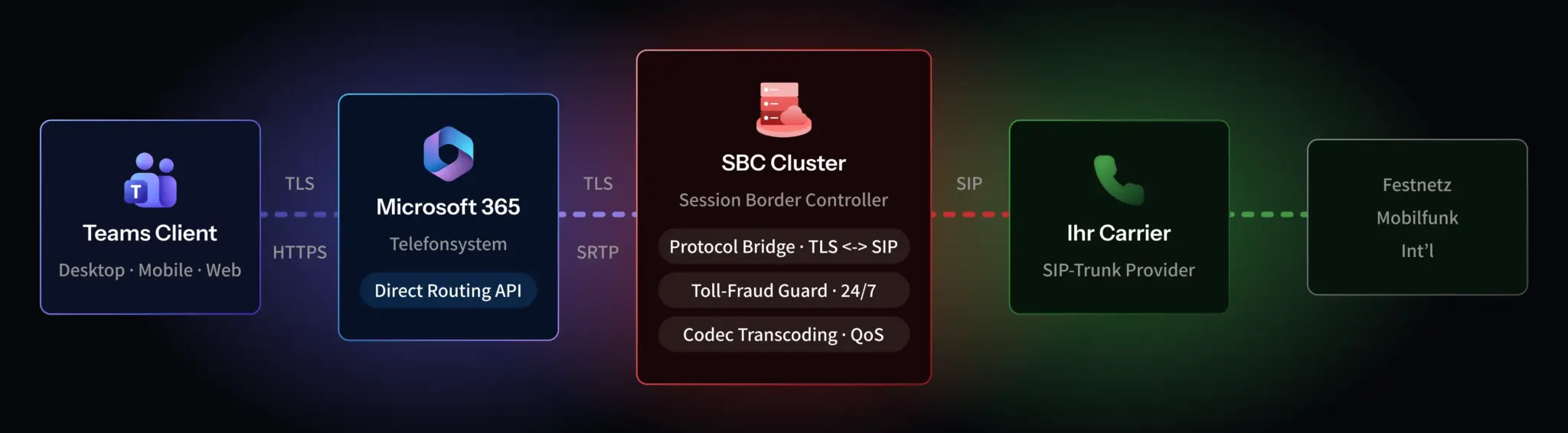
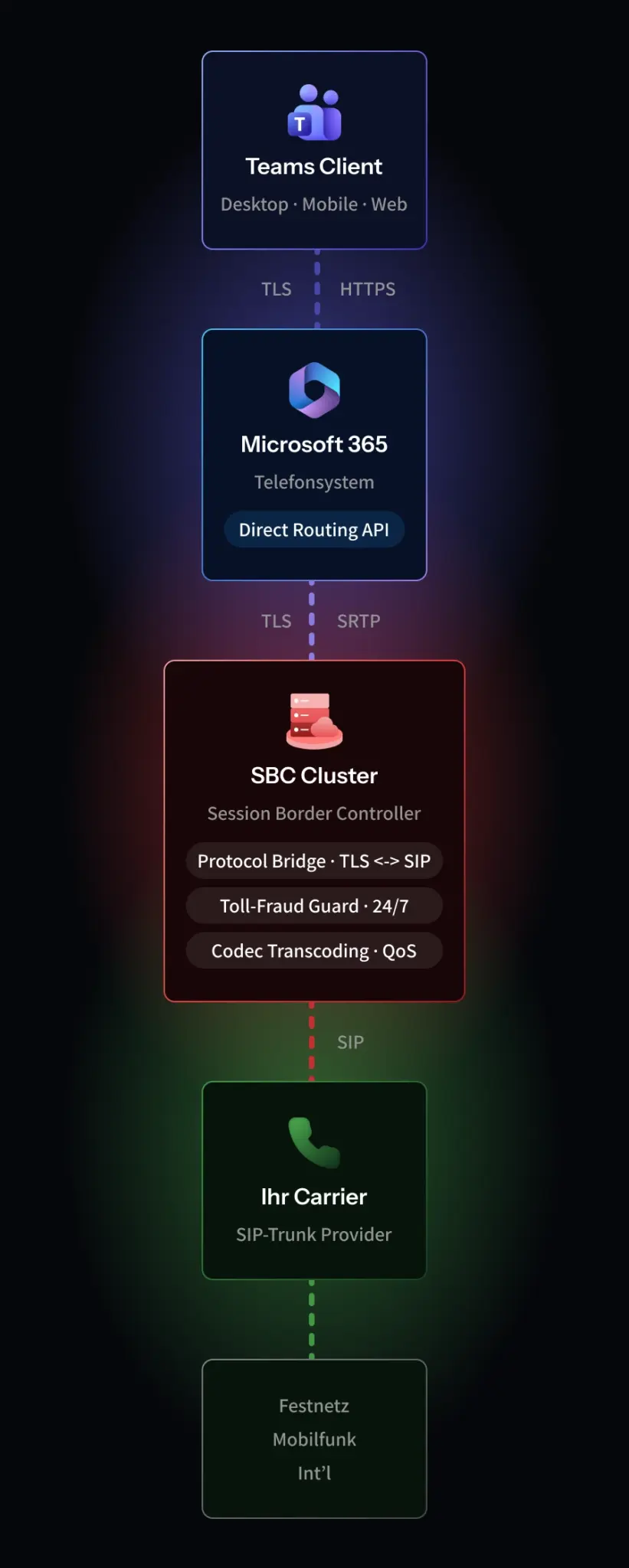
Your employees can make calls directly from the Teams interface, from a desk phone, or on a mobile device. The Microsoft 365 Phone System picks up the call and forwards it in encrypted form to the SBC.
The session border controller acts as an intermediary between the Microsoft environment and the traditional telephone network, verifies every connection attempt, and forwards only authorized traffic. It serves as the controlled boundary between the two networks.
From the SBC, the call travels through your provider’s SIP trunk to the public telephone network—to any landline or mobile number, for both incoming and outgoing calls.
partimus handles the most challenging component in this chain: Setting up, securing, and monitoring the SBC during operation requires in-depth knowledge of voice protocols and Microsoft 365. Instead of setting up this capability in-house, you receive the Session Border Controller as a ready-to-use, hosted service from our data center.
Get a no-obligation quote for Teams calling
The quickest way to determine whether the switch is right for your company is to talk it over. We’ll take a look at your current phone system and show you what a migration to Microsoft Teams would look like in practice—with no obligation.
An SBC housed in our own data center
Telephony is business-critical—if it goes down, so does your reachability. That’s why partimus doesn’t host the Session Border Controller in just any cloud, but in our own data centers in Limburg, Frankfurt, or Munich, designed for high availability and monitored around the clock. This means security, operations, and voice quality are all managed under one roof.
The SBC encrypts voice connections and prevents unauthorized access and billing fraud. Only verified traffic crosses the boundary between Microsoft and the telephone network.
Prioritizing voice data and efficient codec handling ensure clear conversations—whether in the office, working from home, or on the go.
Your call data remains in Germany. Operations and data processing are conducted in compliance with the GDPR in ISO 27001-certified data centers.
Four steps to Teams Calling
A phone system migration doesn’t have to put anyone at risk. partimus migrates in stages, with clearly defined phases and specific deliverables—each phase stands on its own and can be evaluated before the next one begins.
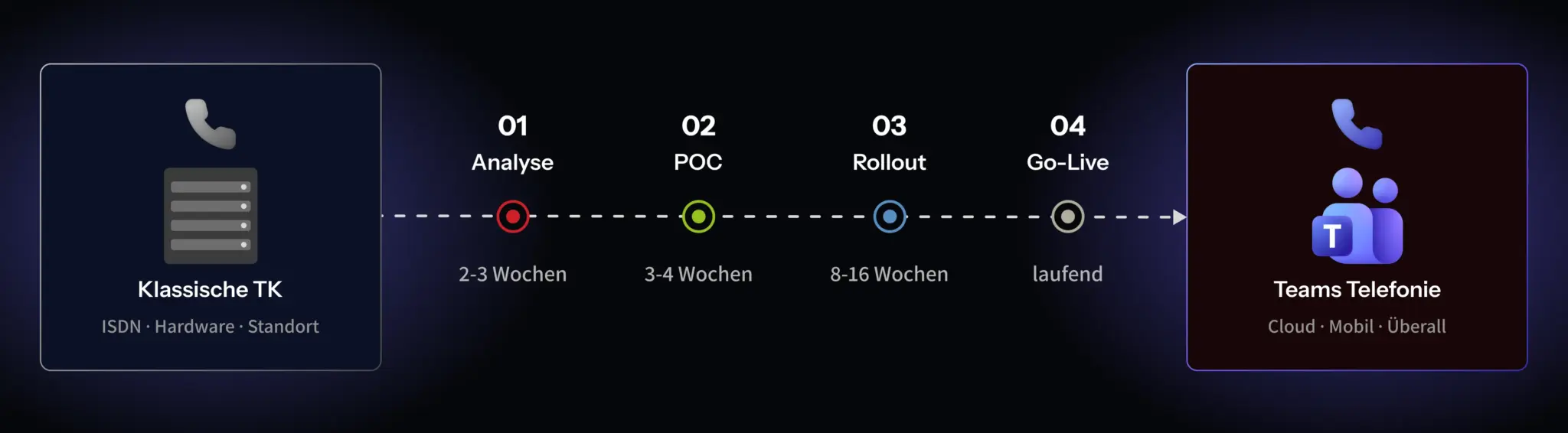
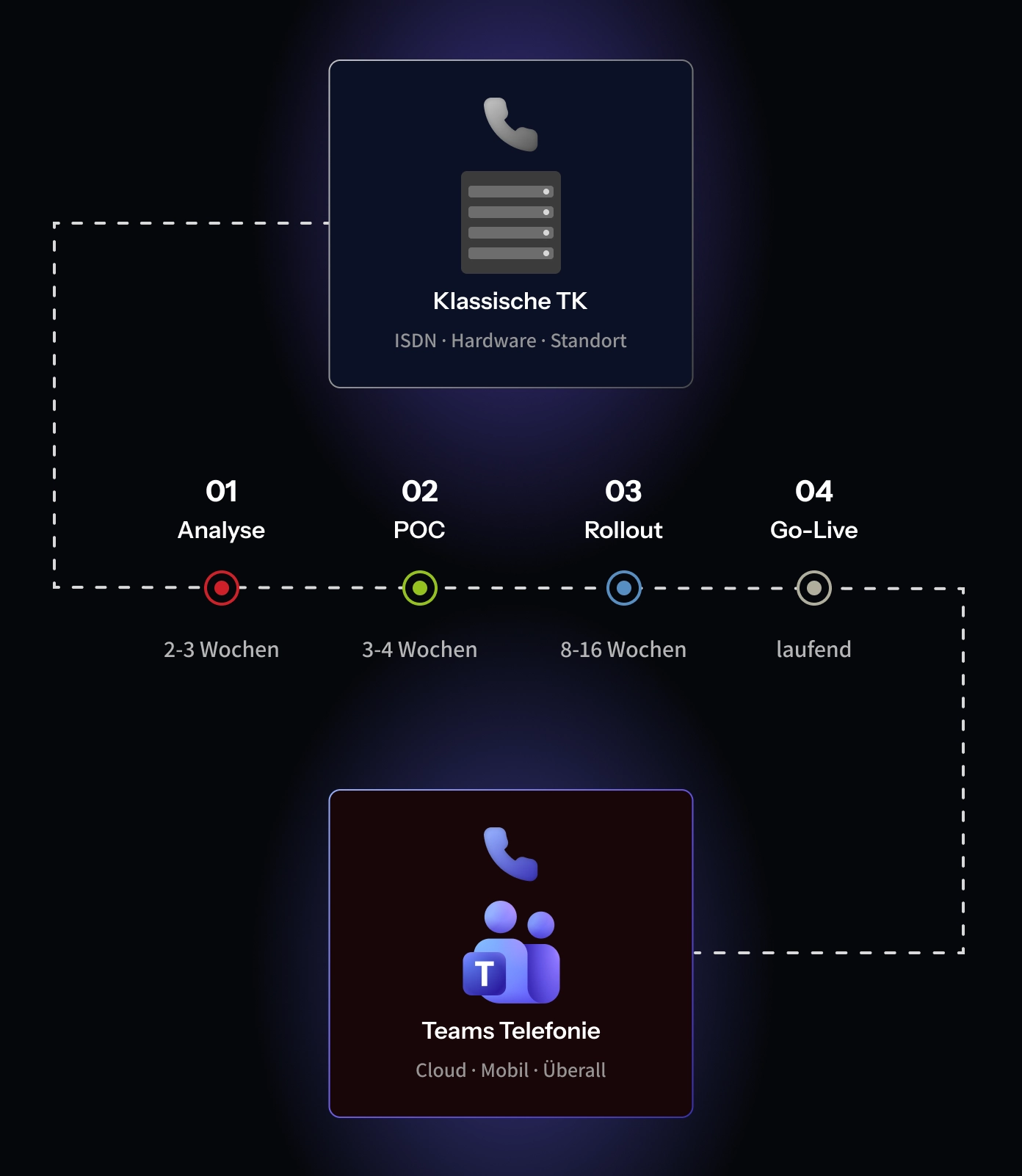
Analysis
We assess your existing telephony system, phone numbers, and requirements, and define the target architecture.
2–3 weeks
Proof of concept
A production-like pilot using real data and equipment demonstrates during daily operations whether everything works properly before you make the switch.
3–4 weeks
Rollout
Employees are migrated in groups, phone numbers are ported, and devices are connected—all while operations continue as usual.
8–16 weeks
Go-Live
The old system is being replaced, partimus will take over the operation and monitoring of the SBC.
Try it at a fixed price before making the switch
Before you fully transition your telephony system, test it in a live environment. We’ll set up a production-ready pilot for you using real phone numbers, real devices, and a real carrier—with clearly defined parameters and a fixed price.
Setup, pilot, evaluation
from real departments
one-time, all-inclusive
- SBC setup & Microsoft tenant configuration
- Test phone numbers with carrier connectivity
- Training & evaluation, technical and business
POC warranty
If the pilot does not meet the acceptance criteria agreed upon in advance, we will reimburse the full cost of the POC—as agreed in writing before we begin.
What sets partimus apart from other providers
Many providers offer team telephony solutions. The difference lies in who’s behind them: partimus operates the data center itself, manages the SBC, and remains your direct point of contact—from migration through to day-to-day operations.
The SBC is not hosted by a third party, but in one of our ISO 27001-certified data centers in Germany. Operations and security are handled by a single provider.
You'll speak directly with the technicians who actually manage your phone service—no ticket system, no switching between hotlines, and no being passed back and forth between Microsoft and your provider.
We handle setup, updates, monitoring, and troubleshooting. This takes the pressure off your IT department, so you don’t have to build up another specialized area of expertise.
We’ll carry out the migration in distinct phases, preceded by a pilot project. This ensures that you remain reachable at all times.
Instead of investing in your own telecommunications hardware, you pay a monthly fee per user—transparent and scalable.
As a Microsoft 365 and infrastructure partner, we help design the environment—from Prime Directory as the central address book to the cloud and managed services.
Phone calls and contacts go hand in hand
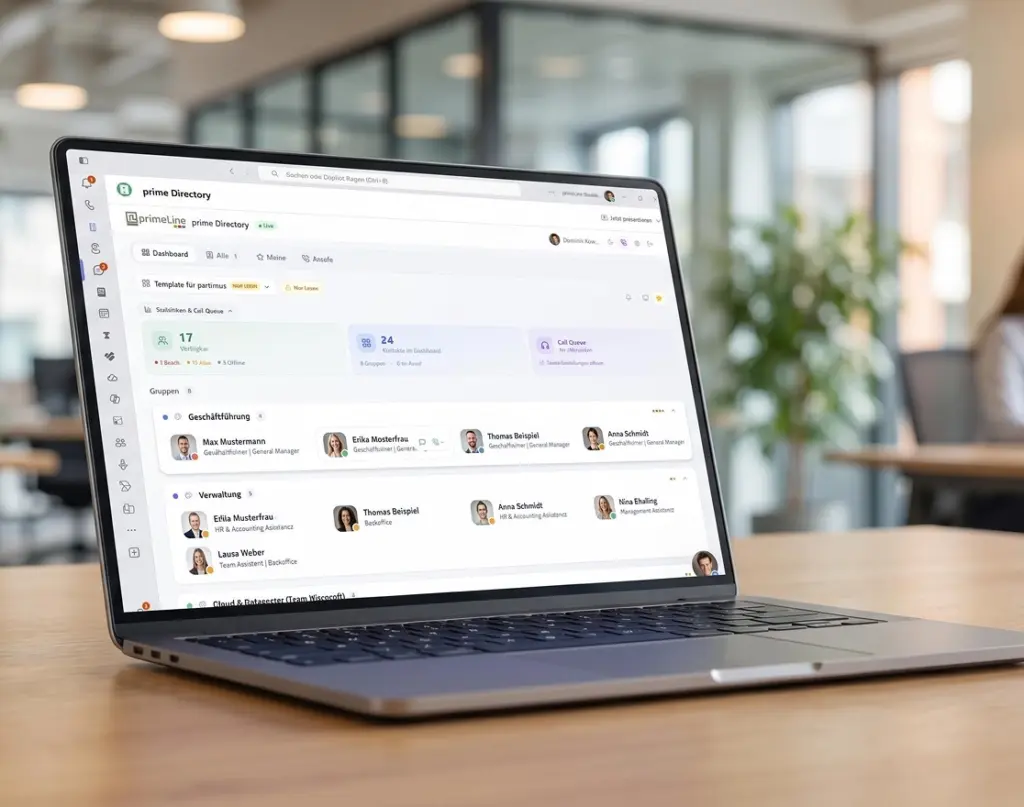
Teams Calling provides the connection— prime Directory provides the contacts. The central address book for Microsoft 365 brings together contact information from Entra ID, Outlook, and CRM in one place and makes it available directly in Teams. The caller’s name is immediately visible. Anyone who wants to make a call can simply start the conversation with a single click.
Entra ID, Outlook, and CRM are integrated, rather than being kept in separate, outdated address books.
Make calls directly from the contact—without having to copy numbers or check the format.
Available, on a call, or away: Your Teams status is clearly visible in the contact list.

Get started with partimus
Take the opportunity to optimize your IT infrastructure and drive your business forward – contact us today to find out more about the tailored benefits partimus can offer you.
Questions and answers about Teams Calling
We’ve summarized the most important questions about Microsoft Teams calling and Direct Routing here. If you have any further questions, you can reach us at any time by email at [email protected] or by phone at 0049 6431 9452-0.
What is Microsoft Teams Calling?
Teams Calling turns Microsoft Teams into a full-fledged phone system. Your employees can make calls to landlines and cell phones directly from Teams—using the same business number on their desktop, in their browser, on their desk phone, and on their mobile device.
What does "direct routing" mean?
Direct Routing is the method used to connect Teams to the public telephone network. A session border controller acts as an intermediary between the Microsoft 365 Phone System and your provider’s SIP trunk. This gives you the freedom to choose your carrier and rate plan.
Do we need an additional Microsoft license?
Yes. For external calls, each user needs a Teams Phone license in addition to a Microsoft 365 or Teams license. We’ll determine which combination makes sense for your company during our initial consultation.
How does Direct Routing differ from Operator Connect?
Operator Connect is quick to set up, but is tied to a specific carrier. Direct Routing offers more flexibility: free choice of provider, integration with existing systems, and custom call rules. For companies with established telephony systems, this is usually the more flexible solution.
Can we keep our existing phone numbers?
Yes. Geo-numbers and group lines will be ported to your new line. Customers and partners can still reach you at your usual numbers.
Can we continue to operate our old phone system in parallel?
Yes. A phased migration is possible, during which the old system and Teams Calling run side by side for a period of time. This minimizes risk and ensures that users remain reachable during the transition.
How secure is this solution?
The session border controller operates in a geographically redundant configuration in our ISO 27001-certified data center in Germany. Voice connections are encrypted, data traffic is monitored, and call data does not leave Germany.
How much does Teams Calling cost?
The costs consist of Microsoft licenses, the managed SBC, and your provider’s call rates. Billing is predictable, on a per-user, per-month basis. Our fixed-price pilot program offers a way to get started without a full migration.