

Central phone book
for Microsoft Teams
The phone book that Microsoft Teams is missing
Microsoft Teams is the central collaboration tool in many companies—but it doesn’t come with a shared address book. Everyone manages their own contacts, external numbers are missing, and the search function only works if you know the exact name.
prime Directory bridges this gap: The central address book for Microsoft 365 brings together contacts from Entra ID, Outlook, and CRM and makes them available as a native tab directly in Teams. Data is automatically synchronized, calls can be placed with a single click, and live status is displayed—providing a single, up-to-date source for the entire team instead of many separate address books.
- Central contact source
- Click-to-Call
- Teams integration
- GDPR-compliant
When no one knows which number is the right one
By default, Teams only shows each user their own contacts—no shared directory, no external numbers, and no useful search function. A central phone book turns all three of these aspects on their head: shared data, both internal and external contacts, and a search function that actually finds what you’re looking for.
-
Scattered sources
Outlook, CRM, Excel, and personal cell phone contacts are all mixed together—none of these address books is complete or up to date. -
Duplicate maintenance
Any change must be updated in multiple places. Most of the time, this doesn't happen, and the data becomes inconsistent. -
No consistent contact information
No one knows for sure which number is correct. Calls go to outdated contacts or reach the wrong person. -
A cumbersome way to make calls
Copy a number from a list, paste it into the dial pad, and hope it’s in the right format—every call involves unnecessary steps. -
Unknown callers
When a call comes in, only a number appears—no name. You won't know who's calling until they say hello. -
External contacts are completely missing
Teams displays some internal information, but customers, suppliers, and partners do not appear in the default address book at all.
-
A well-maintained data source
Entra ID, Outlook, CRM, and other sources are consolidated into a single, centralized address book—complete and up-to-date. -
Automatic synchronization
Changes are applied without anyone having to maintain multiple systems simultaneously. Everyone sees the same version. -
Reliable data
There is exactly one valid contact database that the entire team relies on—no more guessing when it comes to phone numbers. -
Call with a click
From any contact, you can start a call directly with Click-to-Call—no copying, no format checking. -
Names instead of numbers
Incoming calls are automatically identified and displayed by name. Your team knows immediately who is calling. -
Internal and external contacts
Coworkers, customers, suppliers, and partners are all listed together in the phone book, which can be searched directly in Teams.
One source, available everywhere
prime Directory connects the systems where your contacts are already stored and consolidates them into a single, consistent database. Entra ID, Outlook mailboxes, CRM systems, and manually maintained sources are all consolidated in one place and automatically kept up to date—accessible in Teams, Outlook, and on mobile devices.
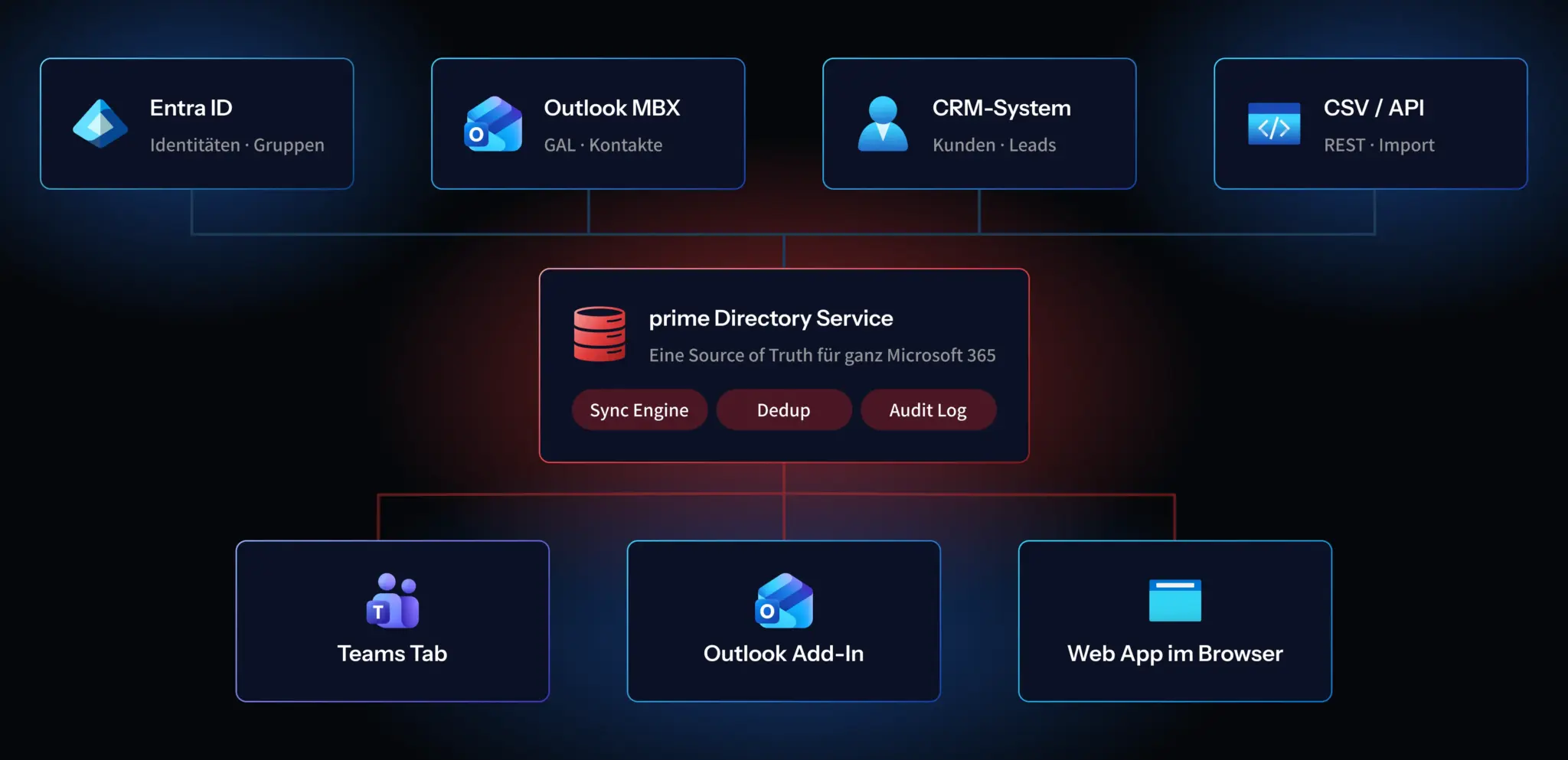
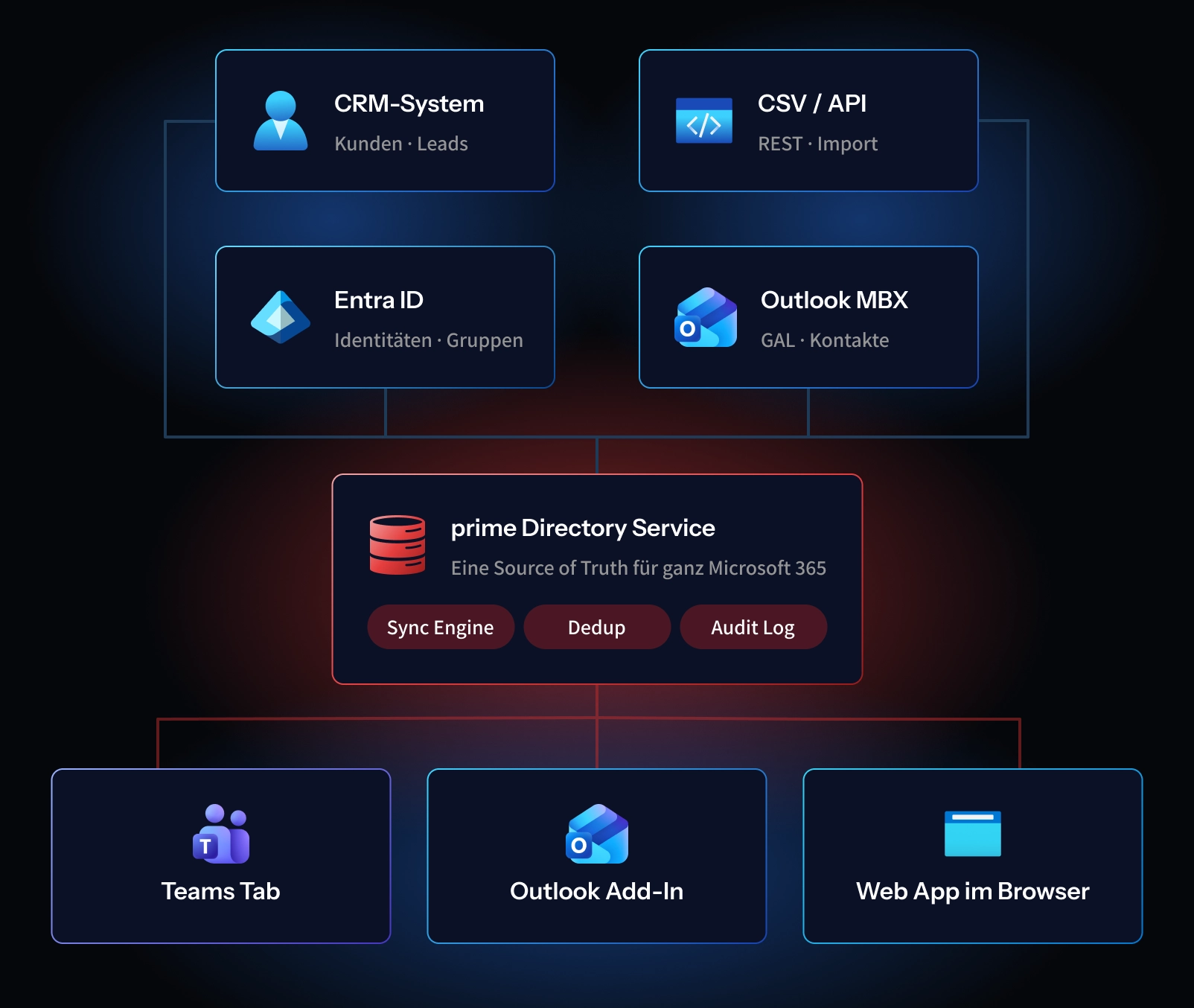
Entra ID, Outlook mailboxes, CRM systems, and manually maintained lists are integrated. All relevant contact sources are consolidated in one place, rather than having to be searched individually.
The sources are synchronized bidirectionally: Data is reconciled, duplicates are removed, and changes are kept up to date in both directions—without the need for manual maintenance.
The completed contact list is available as a native tab in Microsoft Teams, Outlook, and on mobile devices. Your employees can access the same, up-to-date list from anywhere.
Try it for 30 days with no obligation
The easiest way to see what prime Directory can do is to try it out in your own Teams. Test the central address book for 30 days with your real contacts—fully set up, with no obligation. If it doesn’t work for you, access ends automatically.
What prime Directory can do
From automatic data synchronization to one-click calling, prime Directory covers the entire process—from scattered contact information to a completed call. Every feature is designed to help your employees reach the right person faster—without switching tools, without searching for numbers, and without dealing with outdated data.
Entra ID, Outlook, and CRM are synchronized and kept up to date in both directions. One change is all it takes—it takes effect everywhere.
You can search by name, company, department, or note—even by partial matches. Results appear immediately, even with very large contact databases.
With just one click, you can start a call from any contact—directly through Teams calling, without having to copy numbers or check the format.
In addition to making a call, you can start a Teams chat directly from the contact. No need to switch apps or search for the person separately.
Whether available, on a call, or away—your Teams status is visible right in the phone book before you pick up the phone.
Past conversations remain traceable. This way, your employees can see at a glance who last interacted with a contact.
Frequently contacted people are saved as favorites or grouped into shared lists—for example, by team, project, or location.
Contacts can be exported and integrated via an interface if other systems are to access the same database.
Contact information that remains protected
prime Directory works with the identities and permissions that are already in place in your Microsoft 365 environment. No parallel user accounts or separate password database are created—access is managed entirely through your existing Microsoft identities.
Sign-in and permissions are handled through your Microsoft identities. No shadow users, no additional password management.
Access is provided via OAuth 2.0 using short-lived tokens and automatic rotation—a current, validated standard.
The data is encrypted using TLS 1.3 both during transmission and while stored. There are no plaintext paths.
Data processing on behalf of third parties, data minimization, and the right to access and erasure are taken into account from the very beginning.
Depending on your preference, prime Directory can run in your own tenant or at the partimus data center in Limburg, Frankfurt, or Munich—with geographic redundancy and ISO 27001 certification. You decide where your contact data is stored.
Every access and every change is logged in an audit-proof manner. This ensures that it is always possible to trace who viewed or edited what.
Three packages, with transparent pricing
prime Directory grows with your business. From a small team to a large corporation, you pay only for the features you actually need. All prices are per month, plus VAT, with a minimum term of 12 months and the option to cancel on a monthly basis thereafter.
Starter
For small teams of up to 25 people
- Up to 25 users
- Entra ID + Outlook sync
- Click-to-Call · Live status
- Teams tab
- Email support
Business
For companies with up to 250 employees
- Up to 250 users
- Additional CRM connectors
- Plus call history · favorites
- Additional shared lists · smart lists
- Additional audit log · export API
- SLA 99.9% · support 24/5
Recommended!
Enterprise
For corporations and critical industries
- Unlimited users
- Additional self-hosting option
- Additional custom connectors
- In addition, SCIM, SAML
- Plus 24/7 support · a dedicated contact person
- Additional penetration test reports
Monthly
|
Annually
Save 10%
|
3-year contract
Save 18%
Payment by invoice or SEPA direct debit
*All prices are monthly/non-recurring fees plus VAT. Our offer is aimed exclusively at business customers.
How much does it cost to find contacts?
Scattered contact information costs time above all else—every day, with every call. If you add up those seconds over the course of a year, what starts as a minor inconvenience turns into a significant amount of time. Consider a company with 50 employees, each making 5 calls per day, with 30 seconds spent searching for contact information per call, at an hourly rate of €40. Even these few seconds add up significantly over the course of a year.
via Click-to-Call and full-text search
based on €40 per hour
with regard to the Business License
50 employees × 5 calls × 30 sec × 220 workdays ≈ 550 hours. 550 h × € 40 = € 22,000 in saved work time. Business license costs: € 149 × 12 = € 1,788. This results in an ROI of approximately 1,130%—and that’s not even accounting for the benefits of fewer misconnections, cleaner data, and faster onboarding.
Find, call, be reachable—all in one place
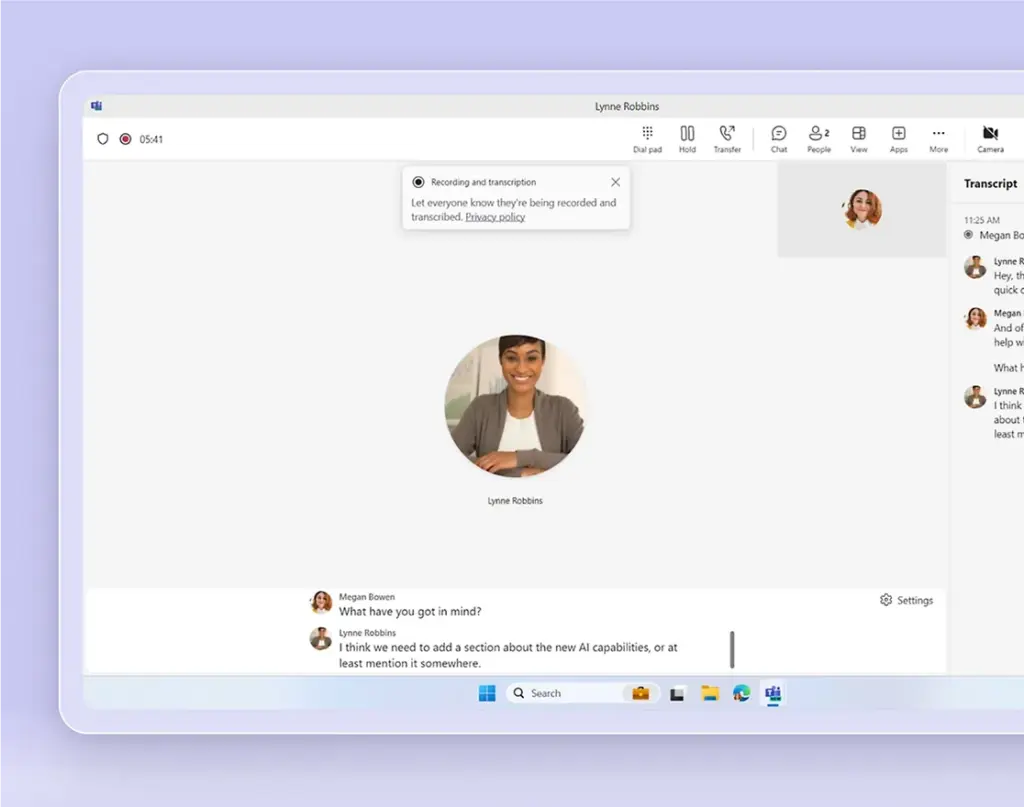
prime Directory provides the contacts, and Teams Calling provides the connection. When you make a call from the central address book with a single click, you’re calling directly through Microsoft Teams—without a separate phone system. Together, they turn Teams into a complete communications hub: find contacts, make calls, and stay reachable—all in one place.
Click-to-Call from prime Directory uses Teams Calling to connect to the public telephone network.
Contacts, calls, chat, and presence are all integrated into Microsoft Teams—without having to switch between applications.
Telephony and the phone book are provided by a partner and operated in the ISO 27001-certified partimus data centers in Limburg, Frankfurt, and Munich.

Get started with partimus
Take the opportunity to optimize your IT infrastructure and drive your business forward – contact us today to find out more about the tailored benefits partimus can offer you.
Questions and answers about prime Directory
Whether it’s data sources, Teams integration, or data protection—we answer the most common questions about the central phone directory here. For any other inquiries, you can reach us by email at [email protected] or by phone at 0049 6431 9452-0.
What is prime Directory?
prime Directory is a central directory for Microsoft 365. It brings together contacts from Entra ID, Outlook, and CRM and makes them available as a native tab directly in Microsoft Teams—with click-to-call, live status, and search across all sources.
Why isn't the address book in Teams enough?
By default, Teams only shows users their own contacts. External numbers are missing, and the search function only finds exact matches for the beginning of names. Teams does not provide a shared, searchable directory for the entire company—and that’s exactly the gap that prime Directory fills.
Which data sources can be connected?
Entra ID, Outlook mailboxes, CRM systems, and manually maintained lists. The sources are consolidated, duplicates are removed, and they are continuously synchronized so that everyone sees the same up-to-date information.
Does prime Directory run directly in Microsoft Teams?
Yes. prime Directory is embedded as a native tab in Teams. Your employees can work in their familiar environment and don’t need to learn how to use an additional application. The directory is also available in Outlook and on mobile devices.
How secure are our contact details?
Access is provided via Entra ID and OAuth 2.0, and data is encrypted using TLS 1.3. Upon request, we can host prime Directory in one of our ISO 27001-certified data centers in Germany—in compliance with the GDPR and with a complete audit log.
Can we run prime Directory in our own tenant?
Yes. You have a choice: run the system in your own Microsoft tenant or have it hosted in the partimus data center. That way, you decide for yourself where your contact data is stored.
How much does prime Directory cost?
Plans start at €49 per month for up to 25 users and go all the way up to the Enterprise plan, which includes an unlimited number of users and self-hosting. Billing is on a monthly basis, with discounts available for longer-term commitments.
Can we test prime Directory in advance?
Yes. You can try prime Directory for 30 days with no obligation using your real contacts—fully set up. If it’s not a good fit, your access will end automatically at no additional cost.